

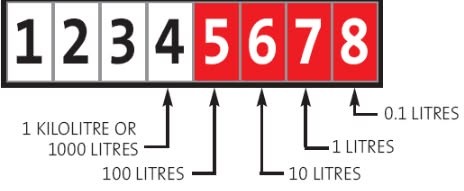
Knowing how to read your water meter can help you monitor your water consumption, detect leaks early and better understand your municipal water account.
Most houses have their own water meter, usually located near the front boundary of the property. In sectional title developments, flats or duplexes, there may be one shared meter or individual meters for each unit.
Your water meter is normally located next to a stop valve (stop-tap), which can be used to turn off the water supply in an emergency, such as a burst pipe.
To check for a possible leak:
- Ensure no water is being used anywhere on the property.
- Record the meter reading.
- Wait at least one hour (or overnight if possible), ensuring that appliances such as washing machines, dishwashers, irrigation systems and toilets are not using water.
- Read the meter again. If the reading has increased, there may be a leak on your property.
How to read the meter:
- Read the numbers from left to right
- The numbers indicate the number of kilolitres (kℓ) used (1 kilolitre = 1,000 litres)
- The numbers indicate the number of litres used
- Only the black (kilolitre) readings are used for municipal billing
Submit your own meter readings
Manage your water and electricity readings more easily using the Overstrand Citizen App.
Simply log your reading via the ‘Accounts Category’ in the Overstrand Citizen App and include:
- Your account or erf number; and
- A clear photograph of the meter reading.